Use case · Getting paid
Overdue invoices, one row per client, with the next step worked out
Late to pay shows how late each client is, what they've been sent and whether they answered. Then it says what to do: write, wait, or pick up the phone.
The case
Northline always paid. Until September.
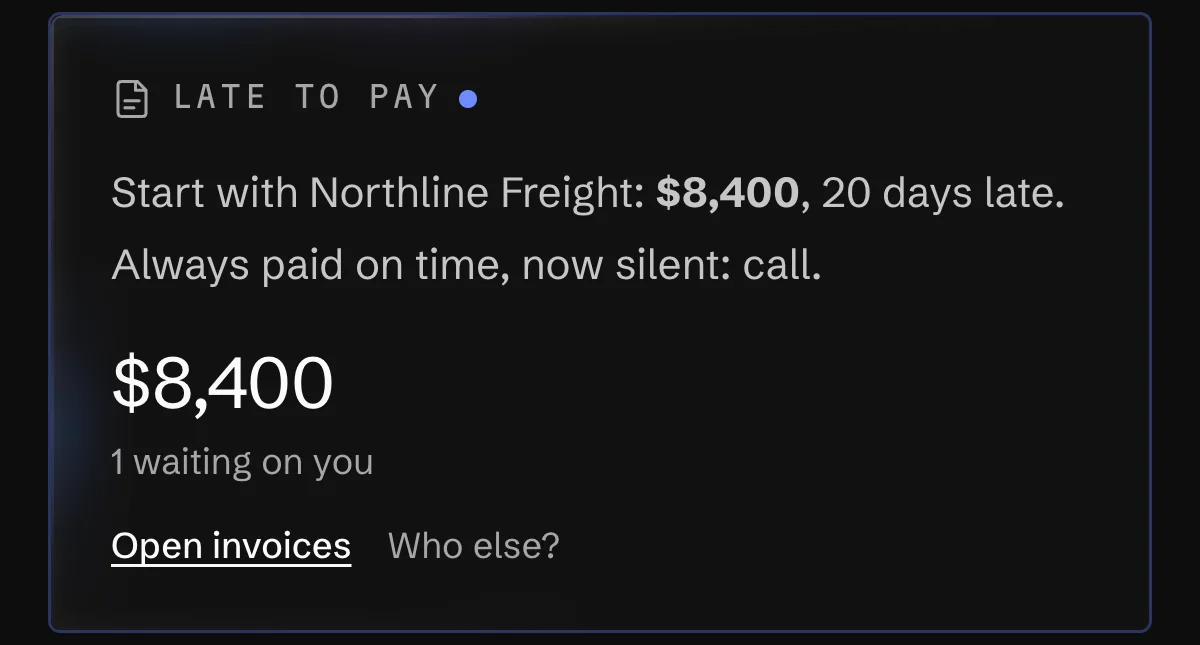
Northline Freight paid nine invoices in a row within three days of the due date. Their September invoice for $8,400 is two weeks late, and one reminder went unanswered. Most tools would send a third polite email. Orla puts Northline at the top of the list with a different step: call them now.
The route
The list, the step, and the one press
Recorded on the demo studio's books. Northline gets a call, Marigold Books gets the letter.
- 01Open Late to payLate to pay
A card on the home page with one line per client behind it: how much, how late the oldest invoice is, how many reminders went, whether they answered, the day they promised.
- 02Read the step
Northline paid on time nine times out of nine and went quiet, so the card says to call rather than send another letter. Orla works the step out from the ledger; it isn't a guess in an answer.
- 03Send the reminder"Send Marigold Books the payment reminder now"Send it
The same reminder the schedule sends, with the pay link, right now. It refuses when the client asked not to be emailed, already had several today, or has no address on the invoice.
- 04See every letterHistory
The invoice panel lists each reminder, automatic or sent by hand, and when the invoice went out. The contact card shows the same across all of their invoices.
Who does what
Where Orla stops and you press
Late to pay, reminders and the collection history come with invoicing on every plan. The AR clerk, which proposes reminders every day, is part of AI staff: none on Free and Starter, one role on Pro.
Orla does
- Works out one next step per client from the ledger: remind, wait, chase a broken promise, or call.
- Sends automatic reminders on an invoice sent with the client's email: three days before, on the day, three and seven days late.
- Keeps the whole collection history on the invoice and on the contact.
You do
- Press Send it, or leave it to the schedule.
- Write down a promise when a client makes one (Write it down), and the list stops pushing them until that day.
- Make the call. After three reminders and silence, another email is the wrong tool.
Orla does not
- Record a promise on its own, or let an AI role record one.
- Keep emailing a client who asked not to be emailed.
- Collect debts or send legal letters.
Questions
What people ask about this
What is an overdue invoice?
An invoice still unpaid after its due date. In Orla it moves into Late to pay the day after it falls due, grouped with that client's other late invoices.
How do you say an invoice is overdue?
Plainly, with the number, the amount, the due date and a way to pay. That's what the reminder schedule sends, from your name in the subject, and a client's reply goes to your billing email.
How long can an invoice be overdue before I call?
Orla's answer is three reminders after the due date with no reply. For a client who always paid on time it's sooner: a week late with one reminder and silence is already unusual for them.
Does Orla send reminders without asking?
Automatic reminders go on invoices you sent with an email address, and you can turn them off per invoice. Send it is your press. An AR clerk only proposes; nothing is sent until someone accepts.
Read next
Where this goes on
See it on your own books
Thirty minutes: we connect an account, drop a real bill in, and close a month together.