Use case · Closing the month
Ask the teammate who paid for the receipt, and it lands on the right expense
Orla lists the biggest expenses with no paper and asks the person who spent the money. Two reminders later, whatever's still missing comes back to you.
The case
Sofia's trip, three weeks later
Sofia flew to Seattle for a client workshop on the company card: a flight, two hotel nights, a camera rental. The receipts are in her phone. The accountant wants them before the quarter closes, and the person who keeps the books wasn't on the trip.
The route
From the list to the receipt on its row
Recorded with two people in the demo studio: the one who asks, and Sofia, who paid.
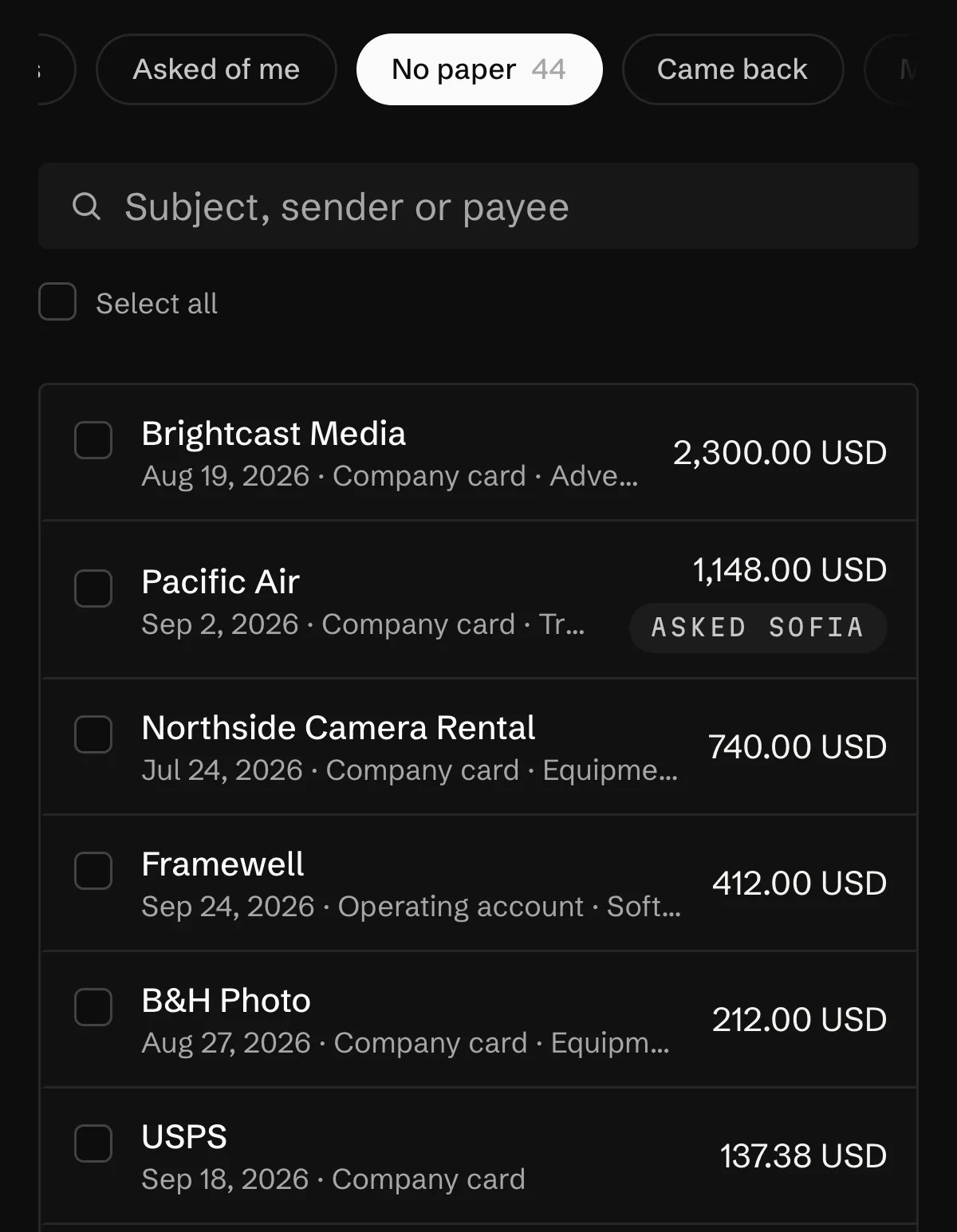
- 01Open the listInboxNo paper
The biggest expenses of the last three months with no document. Transfers between your own accounts, savings and exchange trades never appear here.
- 02Ask for the receiptsAsk for receipts
Tick the rows. Orla picks who to ask: whoever entered the expense or holds the card it was paid with. One send per person carries all of their rows.
- 03The teammate answersAsked of meAttach the receipt
Sofia sees her list in Inbox, or a button in Telegram or Slack. A photo lands on its expense, or she answers No receipt or Not my expense.
Who does what
Where Orla stops and you press
Asking a teammate costs nothing on any plan. It works in business spaces where the feature is switched on for the space. Receiving receipts by email is part of the paid plans, up to 200 emails a month.
Orla does
- Finds the largest expenses without a document and who can answer for each.
- Sends the ask and two reminders, and closes a row the moment any file lands on it.
- Matches receipts forwarded by email to their expense by amount and date.
You do
- Choose the rows and press Ask for receipts.
- Take the photo, if you're the one who paid.
- Decide what comes back: ask someone else, or mark it not needed.
Orla does not
- Let an AI staff role ask your team for receipts.
- Ask anyone outside the space, or anyone who can't see that account.
- Say whether an expense is deductible without a receipt. That's for your tax adviser.
Questions
What people ask about this
How do you keep track of receipts for a small business?
Put the receipt on the expense when it happens, and every so often go through the biggest expenses still missing one. Orla keeps that second list for you and asks the person who can answer.
What happens to a receipt that's lost for good?
Mark the row No paper for this one. It leaves the list for good, so the list keeps showing only what can still be found.
Who can ask the team for receipts?
The owner, an admin and the accountant seat. A member can once the owner gives them that right in Team & access.
Can receipts come in by email?
Yes. Forward them to the space's address, and a receipt waits for its expense and attaches when the amount and date match. The first receipt from a new supplier always waits for a person.
Read next
Where this goes on
See it on your own books
Thirty minutes: we connect an account, drop a real bill in, and close a month together.